The Quiet Drift: Why Your Connected Home Needs a Maintenance Day
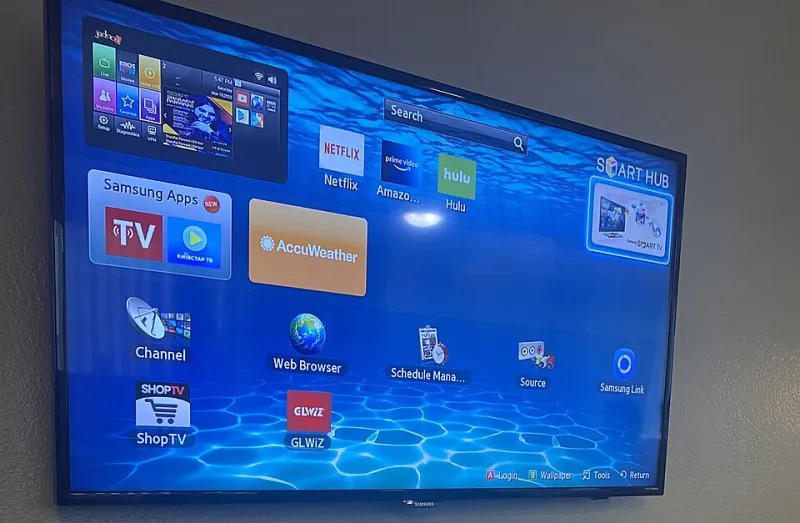
Photo: Dancingpolishcow, CC BY-SA 4.0, via Wikimedia Commons
Smart home gear has a way of feeling self-sufficient. The thermostat learns your schedule, the video doorbell sends clips to your phone, and the front-door lock opens as you walk up. Then one morning the app spins, a camera misses a delivery, and the hub has a yellow light you have never seen before. Nothing is broken, exactly. It has simply drifted out of date.
That drift is the maintenance gap most homeowners never plan for. Unlike a furnace filter or a gutter, connected devices do not announce their needs on a schedule. They wait until a firmware change, a dead battery, or a retired cloud service turns a convenience into a chore. As of November 2026, the smart home is mature enough to deserve a maintenance day, not just an unboxing day.
The myth of the self-maintaining gadget
A conventional appliance asks for attention with a noise, a leak, or a blinking light. A smart device often asks with silence. The app still opens, so you assume the device is fine. Meanwhile, the firmware is two versions behind, the backup battery in the lock is nearly dead, and the camera is running on a cloud plan you forgot you had. The result is a home that looks connected but is held together by postponed updates.
Firmware is the oil change of the connected home
Firmware updates fix security holes, improve battery life, and keep devices speaking the same language as the hub. They also break things. That is why they get skipped. The practical move is to batch them: pick one day each month, open each manufacturer app, and install pending updates while you are home. Do not start a firmware update on a lock or garage controller right before you leave for work. If an update stalls, you want to be there with the manual and the backup key.
Batteries, backups, and the devices that die politely
Battery-powered smart locks, sensors, and cameras usually give a low-battery warning. They also usually give it once, in an app you have muted. Replace batteries on a schedule instead of waiting for the warning. For locks, keep a physical key hidden with a trusted neighbor, not under the mat. For hubs, routers, and cameras that need constant power, a small uninterruptible power supply can carry the system through a short outage and protect it from brownouts. Test the backup once a quarter by unplugging the main power for a minute.
The cloud is somebody else's computer
Every smart device depends on something outside your house: Wi-Fi, a manufacturer server, a mobile app, or all three. When the internet goes down, local schedules may keep running, but remote access and cloud recording usually stop. When a manufacturer retires a service, an otherwise healthy device can become a paperweight. Before you buy, check whether the product works locally and how long the company has supported older models. After you buy, keep the setup instructions and account credentials somewhere you can find them. If a device is critical, such as a lock or a sump-pump alarm, choose one that still works without the cloud.
Privacy settings are maintenance, too
A security tune-up is not just about patching software. It is about deciding what your devices record, who can see it, and how long it stays. Turn on two-factor authentication for every account that offers it. Change default passwords. Review shared users and delete old guests. Check camera fields of view so you are not recording a neighbor's window. Turn off features you do not use, especially microphones and cloud clip uploads. If a device collects data you cannot justify, replace it or disconnect it.
A practical smart-home maintenance checklist
- Update firmware for every hub, camera, lock, thermostat, and smart plug.
- Replace batteries in locks, sensors, and remotes; log the date.
- Test backup power for router, hub, and security gear.
- Confirm remote access works after any router or password change.
- Review app permissions and shared users; remove anyone who no longer needs access.
- Check camera views and privacy zones; clean lenses.
- Verify that critical devices still work if Wi-Fi or the cloud is unavailable.
- Save manuals, account emails, and setup notes in one folder.
Your 2026 security tune-up calendar
Use the change of seasons as a prompt. In January, review accounts and two-factor authentication. In April, test batteries and backup power before storm season. In July, audit camera views and cloud subscriptions. In October, update firmware and confirm that locks and alarms work in cold weather. Add a monthly ten-minute app check between those bigger passes. The exact dates matter less than the rhythm.
When smart becomes a liability
A connected home should reduce friction, not add a second job. If a device needs a subscription, an app, a hub, and a firmware babysitter to do something a dumb switch did for decades, question whether it belongs. Keep the conveniences that earn their keep. Retire the gadgets that only work when everything else does. The goal is not a house full of screens. It is a home that runs smoothly whether or not the server in another state is having a good day.
A little maintenance keeps the smart stuff from getting dumb. Put it on the calendar, keep the backup key where you can reach it, and treat every update like a small home repair: boring, quick, and much cheaper than the alternative.